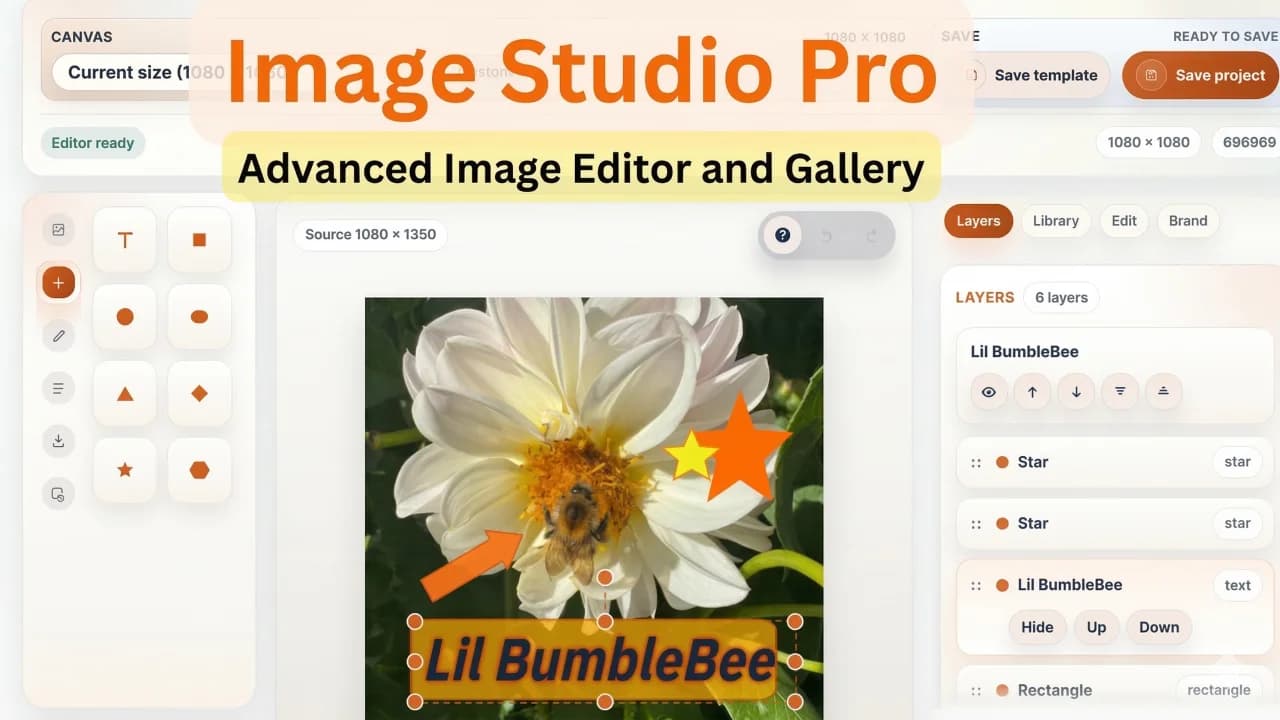
A Filament image editor plugin is useful when users keep leaving your admin panel to crop, resize, annotate, brand, approve, and re-upload images. That workflow is slow, error-prone, and difficult to audit.
For Laravel teams using Filament and Spatie Media Library, the better experience is usually an in-panel editor. Users can start from an existing media item, make changes, export the final asset, and keep the result connected to the same admin workflow.
This guide explains when a Filament image editor makes sense, what to look for in Spatie Media Library workflows, and when Image Studio Pro fits.
The Download-Edit-Reupload Problem
Many admin panels have a hidden creative workflow problem:
- User downloads an image from the panel.
- User opens another design or editing tool.
- User crops, marks up, resizes, or adds text.
- User exports the file.
- User uploads it back to Laravel.
- Someone else loses track of which version is final.
This is acceptable for rare edits. It becomes painful for content teams, ecommerce teams, agencies, marketplaces, and SaaS products where image changes happen every day.
A Laravel admin image editor should reduce that loop.
What a Filament Image Editor Should Include
The exact feature set depends on your product, but most teams need:
- crop and resize tools
- text, shapes, drawing, and markup
- layer controls
- templates for repeatable creative formats
- brand presets for colors and typography
- export to PNG, JPEG, or WebP
- cloud storage support
- revision history or autosave
- permission controls
- approval flows for teams
- integration with forms, table actions, and media records
If your team only needs one cropper field, a lightweight field may be enough. If users need a creative workspace inside Filament, a dedicated plugin is usually better.
Spatie Media Library Editing Workflow
Spatie Media Library is a common choice for attaching files to Eloquent models. The challenge is that media management and media editing are not the same thing.
A useful Spatie Media Library image editor should help users:
- open a media item from a Filament table or form
- create an edited derivative
- save the result to the correct collection
- preserve enough history to understand what changed
- export to the format the product actually needs
- avoid uploading duplicates with unclear names
The goal is not to replace every design tool. The goal is to handle the common admin image edits where leaving the panel is unnecessary.
Image Studio Pro is built for this kind of workflow: canvas editing, templates, brand presets, approvals, cloud storage, and Media Library exports inside Filament.
Use Cases for Laravel Admin Panels
The strongest use cases are repetitive and operational:
- product image markup
- before/after comparisons
- blog and social preview images
- marketplace listing assets
- support screenshots with annotations
- internal review and approval images
- tenant-branded templates for agencies
- lightweight creative tasks for non-designers
These are not always worth a full external design process. They are exactly the kind of work that benefits from being closer to the data and approval workflow.
Cloud Storage and Large Libraries
If your app stores images on S3, GCS, R2, MinIO, or another compatible storage driver, the editor should not assume everything lives on the local filesystem.
Check whether the plugin can:
- browse large libraries without loading everything at once
- read and write to your storage disks
- keep generated assets organized
- work with tenant-aware paths
- handle previews and exports consistently
Large media libraries need careful browsing and indexing. Otherwise, the editor becomes slow just when teams start using it seriously.
Approval Workflows
In-panel editing becomes more valuable when approval is part of the same flow.
For example:
- A content editor creates an image variant.
- A manager reviews it.
- The final image is approved.
- The approved export is attached to the relevant model.
- The old draft stays traceable.
This is especially useful for agencies, marketplaces, and SaaS products where non-technical users produce assets but the business still needs control.
Build vs Buy
Building a canvas editor from scratch can be expensive. You need object selection, text tools, export logic, keyboard shortcuts, storage integration, undo behavior, templates, permissions, and responsive UI. The first demo may be quick. The production editor is not.
Buy or use a dedicated plugin when:
- image editing is part of a recurring admin workflow
- multiple users need the feature
- edited assets must stay connected to Laravel models
- Media Library integration matters
- approvals and permissions matter
- you do not want to maintain a custom canvas editor
Start with Image Studio Pro if your goal is a Filament-native creative studio. For the full product family, browse Filament plugins for Laravel.