A Laravel AI chatbot with API calls is much more useful than a chatbot that only answers text. When the host app exposes the right connector profiles or custom actions, it can check order status, look up subscription information, validate an API key, search a knowledge base, prepare a support handoff, or guide a user through a real workflow.
But it is also more dangerous.
A normal chatbot can give a wrong answer. That is bad enough. A tool-using chatbot can call the wrong API, leak sensitive information, create confusing support records, or trigger actions that should have required confirmation. The moment your AI chatbot can call external APIs, update records, or access user-specific data, you are no longer building just a chat interface. You are building an automation system.
That is why the right question is not only:
“How do I let my Laravel AI chatbot call APIs?”
The better question is:
“How do I let my Laravel AI chatbot call APIs safely, predictably, and with enough visibility to debug what happened?”
This guide explains how to think about API calls, tool calling, connector profiles, RAG, workflow automation, permissions, run tracing, and human handoff in a Laravel and Filament application. It is written for developers, SaaS founders, agencies, and Filament teams that want an AI chatbot that can do useful work without becoming an uncontrolled black box.
If you are looking for the broader strategy behind agentic chatbots, visual workflows, RAG, and Filament as a control plane, read the related guide on the Laravel agentic AI chatbot builder. This article goes deeper into one specific part of that system: safe API calls and tool-using workflows.
Quick Answer
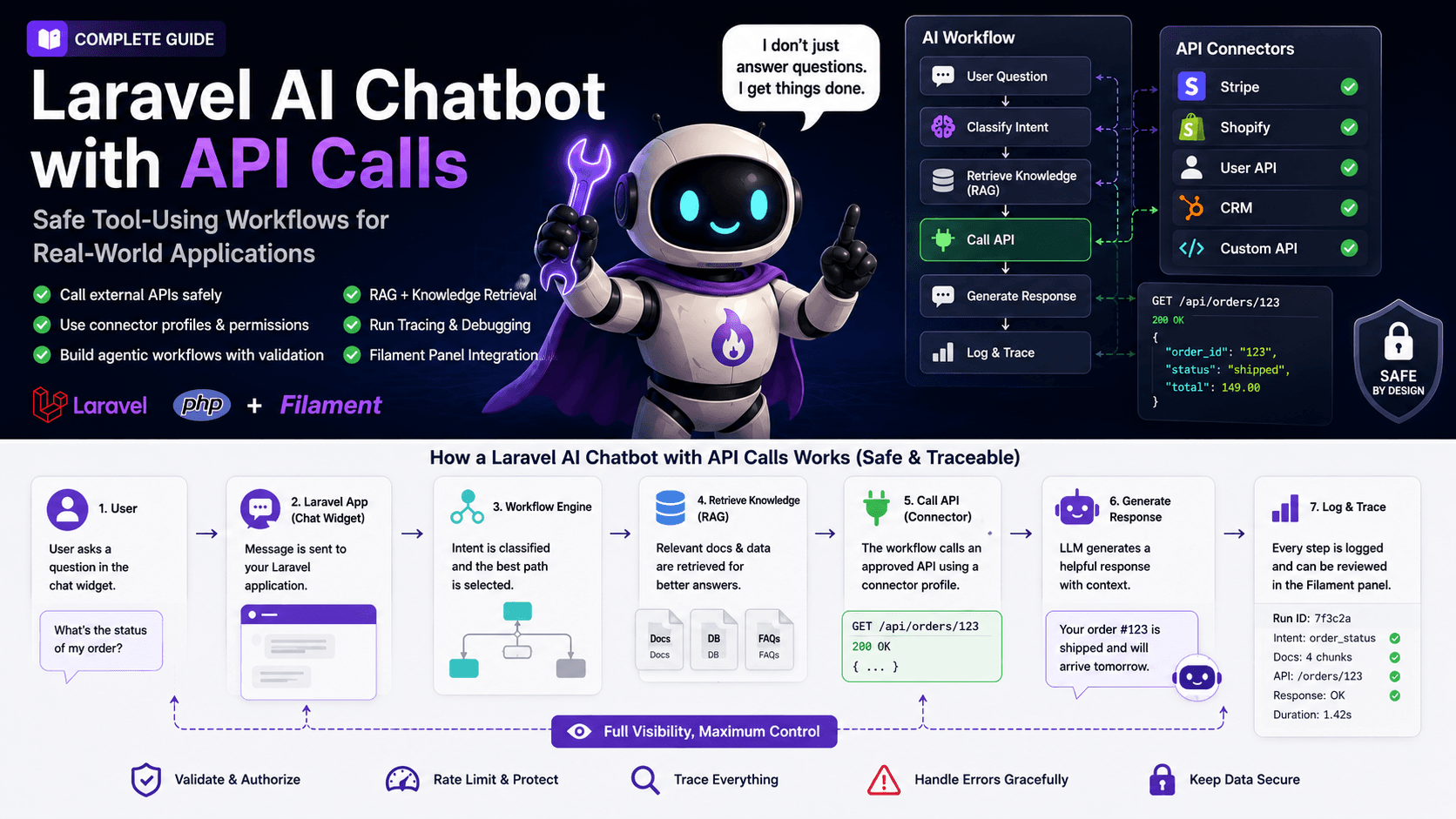
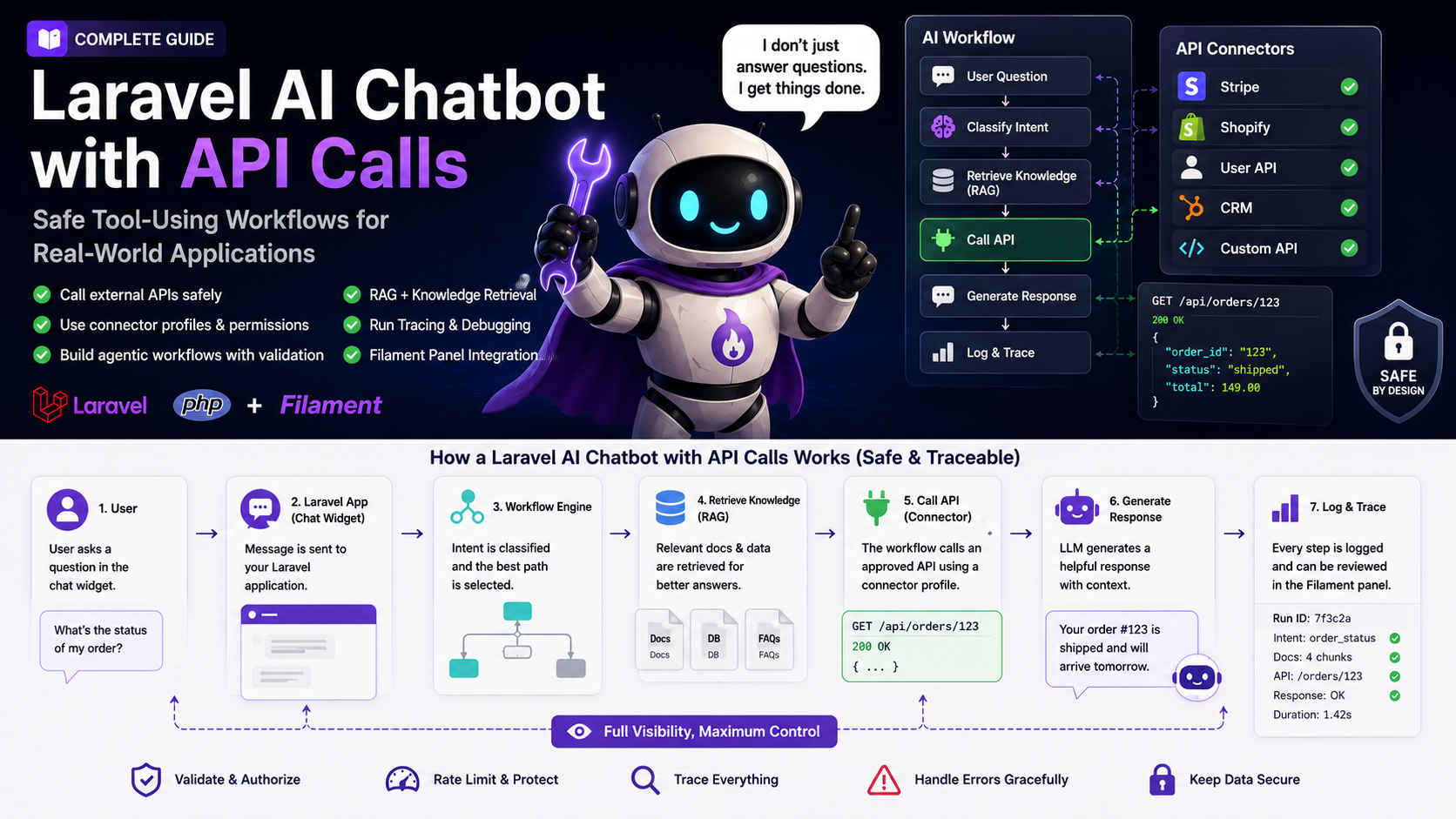
A Laravel AI chatbot with API calls should not be allowed to call random endpoints directly from a prompt. A safer architecture is to define approved tools, validate arguments, use connector profiles, restrict permissions, log every call, and run the chatbot through explicit workflows.
The safest pattern is:
User message
  ↓
Intent classification
  ↓
Workflow decision
  ↓
RAG retrieval if needed
  ↓
Tool/API selection
  ↓
Argument validation
  ↓
Permission check
  ↓
API call
  ↓
Result normalization
  ↓
AI response
  ↓
Run trace
This gives you control over what the bot can do, why it did it, what data was used, and how the final answer was created.
Why API Calls Make an AI Chatbot More Valuable
A chatbot that only answers from a prompt is limited. It can explain, summarize, and guide. That is useful, but many support questions depend on live data.
A user might ask:
- “Why was my payment declined?”
- “Did my webhook fire?”
- “What plan am I currently on?”
- “Can you check if my API key is valid?”
- “Where is my order?”
- “Why is my integration not working?”
- “Can you create a support ticket with this information?”
- “Can you check if my domain is connected correctly?”
A static chatbot cannot answer these questions reliably. It needs access to data or tools. That might mean a Laravel API route, a configured billing connector, a CRM endpoint you provide, your own database, a helpdesk connector, a logging service, or a status endpoint.
That is where API calls change the value of the chatbot. The bot can stop being a polite FAQ layer and start becoming a support assistant. It can look up information, ask for missing details, verify state, and return a response that is specific to the user’s situation.
For Laravel SaaS products, this can be a major advantage. Many support tickets are not difficult. They are repetitive. The user needs a status check, a configuration hint, an explanation of a plan limit, or a guided troubleshooting flow. A well-designed AI chatbot with API calls can handle the first layer before a human needs to step in.
Why API Calls Also Make an AI Chatbot Risky
The risk increases as soon as your chatbot can do more than generate text.
If the bot can call an API, you must answer questions like:
- Which endpoints can it call?
- Which users can trigger those calls?
- Can the bot access account-specific data?
- Does the user need to be authenticated?
- What happens if the model chooses the wrong tool?
- What happens if the model sends incomplete parameters?
- Are dangerous actions blocked or confirmed?
- Can a team member inspect what happened later?
- Are sensitive API results filtered before they are shown?
- Can the bot accidentally reveal data from another customer?
These are not theoretical problems. They are normal application security and product design problems, but with an AI layer on top.
A safe Laravel AI chatbot should never treat the language model as the source of authority. The model can suggest a tool call. Your application should decide whether the tool is allowed, whether the arguments are valid, whether the user has permission, and whether the result can be shown.
That distinction is critical. In a production app, the model should not be the security boundary. Laravel should be the security boundary.
Tool Calling Explained in Simple Terms
Tool calling means the model can request that your application call a specific function or tool. The model does not magically access your server by itself. Your app defines the tools, sends the tool definitions to the model, receives a suggested tool call, executes your own code, and then returns the tool result back into the conversation.
In a Laravel application, a tool might be represented as:
- a service class
- an action class
- a queued job
- an internal API route
- an external HTTP request
- a database lookup
- a workflow node
- a connector profile
- a configured helpdesk connector or handoff action
- a configured billing provider lookup
For example, you might define a tool called get_subscription_status. The model can request that tool when the user asks about their plan. Your Laravel app then checks authentication, validates the customer ID, calls your billing service through approved code or a configured connector, normalizes the result, and returns a safe summary.
The important part is that your application owns execution. The model can request. Your Laravel code decides.
That pattern gives you flexibility without giving the model uncontrolled power.
A Safer Architecture for Laravel AI Tool Calling
A safe architecture should separate the chat experience from the tool execution layer.
A basic architecture might look like this:
Chat Widget
  ↓
Laravel Chat Controller
  ↓
Bot Configuration
  ↓
Workflow Engine
  ↓
Tool Registry
  ↓
Permission Layer
  ↓
Connector Profile
  ↓
External API / Internal Service
  ↓
Result Normalizer
  ↓
LLM Response
  ↓
Conversation + Run Trace
Each part has a responsibility.
The chat widget captures the user message. The Laravel controller authenticates the request and loads the correct bot configuration. The workflow engine decides whether the bot should answer directly, retrieve knowledge, ask a follow-up question, or call a tool. The tool registry defines which tools exist. The permission layer checks whether the current user or bot is allowed to use the tool. The connector profile stores configuration for an approved integration. The result normalizer transforms raw API responses into safe, predictable data. The run trace records every important step.
This might sound more complex than a simple controller that sends messages to an AI provider. But the complexity is there for a reason. When a chatbot can call tools, you need a system you can trust.
Connector Profiles vs Random API Access
One of the best ways to make API calls safer is to avoid “random API access.”
Random API access means the bot can decide from a prompt that it should call some endpoint, with loosely defined behavior, unclear permissions, and unpredictable data handling. That may work in a demo, but it is fragile in production.
A better pattern is connector profiles.
A connector profile is a predefined integration configuration in your app. It describes what system can be called, which credentials or environment variables are used, which actions are allowed, what input is required, and how responses should be handled. It is a safe extension point, not a promise that every third-party vendor integration ships prebuilt.
For example, after you configure the relevant service or custom endpoint, you might use connector profiles or custom actions for:
- billing or subscription lookup
- order status lookup
- webhook delivery check
- customer account lookup
- CRM lead handoff
- helpdesk ticket or handoff preparation
- documentation search
- internal status check
- GitHub issue lookup
- Slack notification
Instead of telling the model, “You can call any API,” you give the workflow access to specific connector profiles. Each profile can be reviewed, tested, logged, and restricted.
This makes the system easier to reason about. It also makes it easier for teams to manage API behavior from an admin panel such as Filament.
Example Use Case: Order Status Support Bot
Imagine you run a Laravel SaaS or ecommerce-like product where users often ask about the status of an order, invoice, import job, or report generation.
A user asks:
“Where is my order?”
A normal chatbot might answer with generic instructions: “Please check your dashboard.” That is not very helpful.
A tool-using chatbot can do better:
- Identify that the user asks for order status.
- Ask for an order number if missing.
- Check whether the user is authenticated.
- Verify that the order belongs to the current user.
- Call the configured order/status endpoint.
- Normalize the result.
- Explain the status in plain language.
- Offer the next step if there is a delay.
- Store the tool call in the run trace.
The answer might be:
“Your order is currently processing. The latest update was today at 10:42. It is waiting for payment confirmation, so the next step is to verify your billing method. If this looks wrong, I can prepare a support summary.”
This is much better than a generic answer because it uses real data. But it only works safely if the Laravel app checks ownership and permissions before calling or returning anything.
Example Use Case: Webhook Troubleshooting
Webhook issues are a perfect use case for an AI chatbot with API calls.
A user might ask:
“My webhook does not fire.”
This question is often incomplete. The bot needs details:
- Which event type?
- Which endpoint?
- Which environment?
- What response code?
- Was the signing secret changed?
- Are there recent delivery attempts?
- Did the endpoint return a 2xx response?
A safe agentic workflow could look like this:
Classify issue as webhook troubleshooting
  ↓
Ask for missing integration details
  ↓
Retrieve webhook documentation with RAG
  ↓
Call the configured webhook delivery lookup
  ↓
Check recent delivery attempts
  ↓
Explain likely cause
  ↓
Prepare escalation summary if unresolved
The key is that the bot does not just call a webhook API because it feels like it. The workflow defines when the tool should be used, what data is required, and what result can be shown.
This turns a messy support conversation into a guided diagnostic flow.
Example Use Case: Billing and Subscription Questions
Billing questions are common, but they require extra care. A chatbot can help explain plan limits, billing cycles, invoices, and subscription status. But it should not expose sensitive information or perform risky actions without confirmation.
A user might ask:
“Why was I charged?”
A safe chatbot should not guess. It should first identify whether the user is authenticated. Then it can call an approved billing lookup tool or configured connector that returns limited, safe information:
{
  "plan": "Pro",
  "billing_period": "monthly",
  "last_invoice_status": "paid",
  "last_invoice_amount": "$29",
  "renewal_date": "2026-06-14"
}
The bot can then explain:
“Your account is on the Pro monthly plan. The latest invoice was paid for the current billing period, and the next renewal is scheduled for June 14. If you expected a different plan, I can help you prepare a support request.”
Notice what the bot does not do. It does not reveal full payment details. It does not change the subscription. It does not issue a refund. It does not expose raw billing provider data. Those actions should require stricter permissions and usually human review.
Example Use Case: Lead Qualification Chatbot
API calls are not only for support. They can also help with sales and onboarding.
A lead qualification chatbot can ask structured questions:
- What type of project are you building?
- What framework do you use?
- How many users do you expect?
- Do you need support automation?
- Do you already use Laravel or Filament?
- Do you need API integrations?
- What is your timeline?
Then the bot can prepare a CRM record or notify your team through an approved connector profile or custom action, not arbitrary API access.
The workflow might be:
Ask qualification questions
  ↓
Classify lead type
  ↓
Prepare CRM lead payload
  ↓
Send internal notification
  ↓
Recommend next step
This can be useful for agencies, SaaS products, plugin sellers, and consulting businesses.
RAG Still Matters When You Use API Calls
It is tempting to think that API calls replace RAG. They do not.
RAG and API calls solve different problems.
RAG helps the chatbot answer from trusted knowledge. API calls help the chatbot access live or account-specific data.
For example, if a user asks:
“Why did my webhook fail?”
The bot may need both:
- RAG to retrieve your webhook troubleshooting guide
- an API call to check recent webhook delivery attempts
If a user asks:
“What does my current plan include?”
The bot may need both:
- an API call to check the user’s current plan
- RAG to retrieve the current plan feature documentation
This combination is powerful. RAG gives context. API calls give state. The workflow decides how to use both.
A Laravel AI chatbot with API calls should therefore not be designed as an alternative to RAG. It should be designed as a workflow layer that can use RAG and tools together.
Why Run Tracing Is Critical
Run tracing is one of the most important features for a tool-using AI chatbot.
Without tracing, you only see the final answer. That is not enough. If the answer is wrong, you need to know why.
A good trace should show:
- the user message
- the selected bot
- the detected intent
- the workflow path
- the retrieved sources
- the selected tool
- the tool arguments
- the permission result
- the API response summary
- the final answer
- any errors or fallbacks
This helps developers and support teams debug the system.
For example, maybe the bot gave a bad answer because the wrong documentation was retrieved. Or maybe the API returned stale data. Or maybe the user asked an ambiguous question and the bot should have asked a follow-up instead of calling a tool. Without a trace, you are guessing.
With traces, you can improve the workflow, fix sources, adjust prompts, or change connector behavior.
This is one reason a tool-using chatbot should be managed as a product feature, not as a hidden prompt inside a controller.
Security Rules for Laravel AI Chatbots with API Calls
Security should be designed into the workflow from the beginning.
Here are practical rules:
-
Never trust the model as the permission layer
The model can suggest an action, but Laravel should decide whether it is allowed. -
Validate all tool arguments
Use request validation, DTOs, enums, and strict schemas. Do not pass raw model output directly into dangerous code. -
Check user ownership
If the bot looks up an order, subscription, or account, verify that it belongs to the current user. -
Use allowlists
Only approved tools and connector profiles should be available. -
Avoid dangerous write actions at first
Start with read-only tools. Add write actions later with confirmation and stronger logging. -
Normalize API responses
Do not show raw provider responses to users. Convert them into safe, user-friendly summaries. -
Rate-limit public widgets
Anonymous chatbot widgets should have limits to prevent abuse and cost spikes. -
Log tool usage
Store which tool was called, why, with what arguments, and what happened. -
Add human handoff
The bot should know when to stop and escalate. -
Test workflows with realistic prompts
Users will ask incomplete, emotional, vague, or messy questions. Test for that.
These rules are not optional if the chatbot touches customer-specific data.
A Practical Laravel Implementation Pattern
A clean Laravel implementation might use action classes for tools.
For example:
final class GetSubscriptionStatusAction
{
    public function handle(User $user): SubscriptionStatusDto
    {
        // 1. Check permission
        // 2. Load billing customer
        // 3. Call billing provider
        // 4. Normalize response
        // 5. Return safe DTO
    }
}
Then your tool registry can expose this action to the workflow engine as an approved tool:
[
    'name' => 'get_subscription_status',
    'description' => 'Get the current authenticated user subscription status.',
    'requires_auth' => true,
    'risk_level' => 'read_only',
    'handler' => GetSubscriptionStatusAction::class,
]
For more advanced systems, you can store tools and connector profiles in the database and manage them from Filament. That gives your team a clean interface for enabling, disabling, testing, and reviewing integrations.
The point is not the exact code shape. The point is the separation:
- the model does not execute tools directly
- Laravel validates and authorizes
- tools return safe structured results
- workflows decide when tools are used
- traces record the full run
This separation keeps the system maintainable.
Read-Only Tools First, Write Actions Later
When building an AI chatbot with API calls, start with read-only tools.
Good first tools include:
- get current plan
- get order status
- get integration status
- get webhook delivery attempts
- search documentation
- search known issues
- get account configuration summary
- get usage limits
- get latest import job status
These tools are useful but relatively safe because they do not change state.
Write actions require more caution. Examples include:
- prepare support ticket or handoff payload
- update CRM record through a configured custom action
- send Slack notification
- trigger re-sync
- regenerate API key
- cancel subscription
- issue refund
- update user settings
Some write actions are safe enough with confirmation. Others should remain human-only. A chatbot should not be allowed to do everything just because it is technically possible.
A good rule:
If a wrong action could cost money, expose private data, break an integration, or frustrate a customer, require confirmation or human review.
How Filament Helps Manage API Connectors
Filament is a strong fit for this type of system because it gives you an admin interface for operational configuration.
Instead of hardcoding everything, you can manage:
- available bots
- connector profiles
- API credentials references
- allowed tools
- workflow nodes
- prompt templates
- source settings
- widget settings
- domain restrictions
- conversation history
- run traces
- analytics
- testing panels
This is especially useful for agencies and SaaS teams. Developers define the safe technical boundaries. Product or support teams can manage operational settings inside Filament.
For example, a support manager might not need to edit Laravel code, but they might need to update a workflow, change a helpdesk handoff message, disable a connector, or review failed runs. Filament can provide that control panel.
That is the difference between a developer demo and a usable internal product.
Where Filament Agentic Chatbot Fits
If you are building a chatbot that only answers FAQ questions, a simple RAG setup may be enough.
But if your chatbot should combine RAG, API calls, visual workflows, connector profiles, widget delivery, conversation history, and run tracing, you need a more complete system.
That is the use case for Filament Agentic Chatbot. It is designed for Laravel and Filament teams that want to manage agentic chatbot workflows from the Filament panel instead of rebuilding every operational feature from scratch.
You can also review the commercial plugin page here: Agentic AI Chatbot Builder on Filament.
The main idea is simple: let the chatbot answer from trusted knowledge, follow explicit workflows, call approved APIs through configured connectors or custom actions, and store traces so your team can improve the system over time.
Build vs Plugin
Building your own Laravel AI chatbot with API calls can be a good decision if your use case is small or deeply custom.
Build it yourself if:
- you only need one internal chatbot
- you only need one or two read-only tools
- you do not need an embeddable widget
- you do not need a visual workflow builder
- support teams do not need to manage anything
- you are comfortable maintaining tool calling infrastructure
Use a plugin or existing system if:
- you need multiple bots
- you need visual workflows
- you need RAG source management
- you need API connector profiles
- you need an embeddable widget
- you need conversation history
- you need run tracing
- you need a Filament admin interface
- you want to launch faster
- you want reusable infrastructure for multiple projects
The biggest cost is often not the first prototype. The biggest cost is maintaining everything after users start using it. Once you need source ingestion, permissions, traces, widget security, analytics, workflow testing, and connector management, the project grows quickly.
Common Mistakes
Mistake 1: Letting the Model Decide Too Much
The model should not decide security, permissions, or data access. It can help select an action, but Laravel should enforce the rules.
Mistake 2: No Tool Validation
Every tool call should have strict validation. If the tool expects an order ID, validate the format. If it expects an enum, use an enum. If the user must be authenticated, check it before execution.
Mistake 3: Showing Raw API Responses
Raw API responses are often too detailed, confusing, or sensitive. Normalize the result before passing it back into the final answer.
Mistake 4: No Trace
If you cannot inspect what happened, you cannot improve the bot. Tracing is essential for production.
Mistake 5: Starting with Dangerous Write Actions
Do not begin with refunds, cancellations, destructive updates, or account changes. Start read-only, then add safer write actions with confirmation.
Mistake 6: Ignoring RAG
API calls give live state, but they do not explain your product. Keep your docs and knowledge sources connected.
Mistake 7: No Human Handoff
The bot should not pretend to solve everything. A good handoff can be more valuable than a forced answer.
Implementation Checklist
Use this checklist before shipping a Laravel AI chatbot with API calls.
Tool Design
- Are tools clearly named?
- Does each tool have a narrow purpose?
- Are tool inputs validated?
- Are tool outputs normalized?
- Are dangerous tools disabled by default?
- Is each tool assigned a risk level?
Permissions
- Does every tool check authentication when needed?
- Does the app verify account ownership?
- Are admin-only tools protected?
- Are connector profiles limited by bot or workflow?
- Are public widget users restricted?
Workflow
- Does the bot ask for missing information before calling tools?
- Are tool calls attached to explicit workflow steps?
- Is there a fallback path?
- Is there a human escalation path?
- Can workflows be tested before publishing?
RAG
- Are support docs connected?
- Are sources up to date?
- Can the bot cite or reference trusted knowledge?
- Is retrieval reviewed when answers fail?
Observability
- Are tool calls logged?
- Are workflow paths stored?
- Are errors visible?
- Can support teams review conversations?
- Can developers inspect run traces?
Security
- Are rate limits configured?
- Are sensitive fields filtered?
- Are write actions confirmed?
- Are API credentials hidden?
- Are domain restrictions configured for widgets?
If you can answer yes to most of these, you are much closer to a production-ready system.
Recommended Starting Point
Start with one support workflow.
Do not begin by connecting every API in your product. Choose one repeated support problem that wastes time. Good first candidates are:
- webhook troubleshooting
- subscription status questions
- order or report status
- integration setup
- API key validation
- usage limit explanation
- onboarding checklist
- support ticket preparation
Build a workflow around that single problem. Add RAG for the docs. Add one safe read-only API call. Add a trace. Test it with messy user messages. Improve the workflow. Then add the next use case.
This approach keeps the chatbot useful and controlled.
A simple rule helps:
If the user needs an answer, use RAG. If the user needs current state, use an API call. If the user needs to complete a process, use a workflow.
FAQ
How do I build a Laravel AI chatbot with API calls?
Build a chat endpoint, define approved tools, validate tool arguments, check permissions, call internal or external APIs through service classes, configured connectors, or custom actions, normalize the result, and store a run trace. For production use, connect this to explicit workflows instead of letting the model call tools freely.
Can an AI chatbot call external APIs in Laravel?
Yes. A Laravel AI chatbot can call external APIs when your application exposes them through approved code, connector profiles, or custom actions. The model should request a tool call, but your Laravel app should validate, authorize, execute, and log the call.
What is tool calling in an AI chatbot?
Tool calling is a pattern where the model requests a function or tool, and your application executes it. The tool can look up data, call an API, search a database, prepare a ticket or handoff payload, or perform another approved action.
Is tool calling safe?
Tool calling can be safe if you use strict tool definitions, validation, permissions, connector profiles, rate limits, and traces. It is unsafe if the model can call arbitrary APIs or execute actions without checks.
Should my chatbot use RAG or API calls?
Use both when needed. RAG answers from trusted knowledge. API calls retrieve live or user-specific data. Workflows decide when each one should be used.
What API calls should I start with?
Start with read-only calls such as subscription status, order status, webhook delivery status, integration configuration, account limits, or job status. Avoid dangerous write actions until your workflow and permissions are mature.
Can a Laravel AI chatbot prepare support tickets?
Yes. A chatbot can prepare ticket or handoff payloads, and actual ticket creation should depend on a configured helpdesk connector or custom action. It should collect structured details first and preferably show the user a summary before submitting.
Why is run tracing important?
Run tracing helps you debug why the chatbot answered a certain way. It shows the intent, workflow path, retrieved sources, tool calls, arguments, results, errors, and final response.
How can Filament help with AI chatbot API calls?
Filament can act as the admin control plane. You can manage bots, connector profiles, workflows, widget settings, conversation history, source ingestion, analytics, and traces from the Filament panel.
What is the best architecture for an AI chatbot with API calls?
A good architecture separates the chat UI, bot configuration, workflow engine, tool registry, permission layer, connector profiles, API execution, result normalization, and run tracing. This keeps the system safer and easier to maintain.
Final Thoughts
A Laravel AI chatbot with API calls can be a real competitive advantage. It can answer questions from trusted docs, check live data, guide troubleshooting, prepare support handoffs or ticket payloads, and reduce repetitive support work.
But the useful version is not the version that gives the model unlimited power. The useful version is controlled. It uses explicit workflows, approved connector profiles, validated tool arguments, Laravel permissions, safe API responses, and traceable runs.
That is the difference between a demo and a product.
If you are building this inside a Laravel and Filament stack, do not treat API calls as an afterthought. Design them as part of the workflow system. Start with one safe use case, connect the right knowledge sources, add a read-only tool, log the full run, and improve from real conversations.
That is how you move from a chatbot that only talks to an AI support assistant that actually helps users get things done.