01 · Element
Ember
Fire · Courage
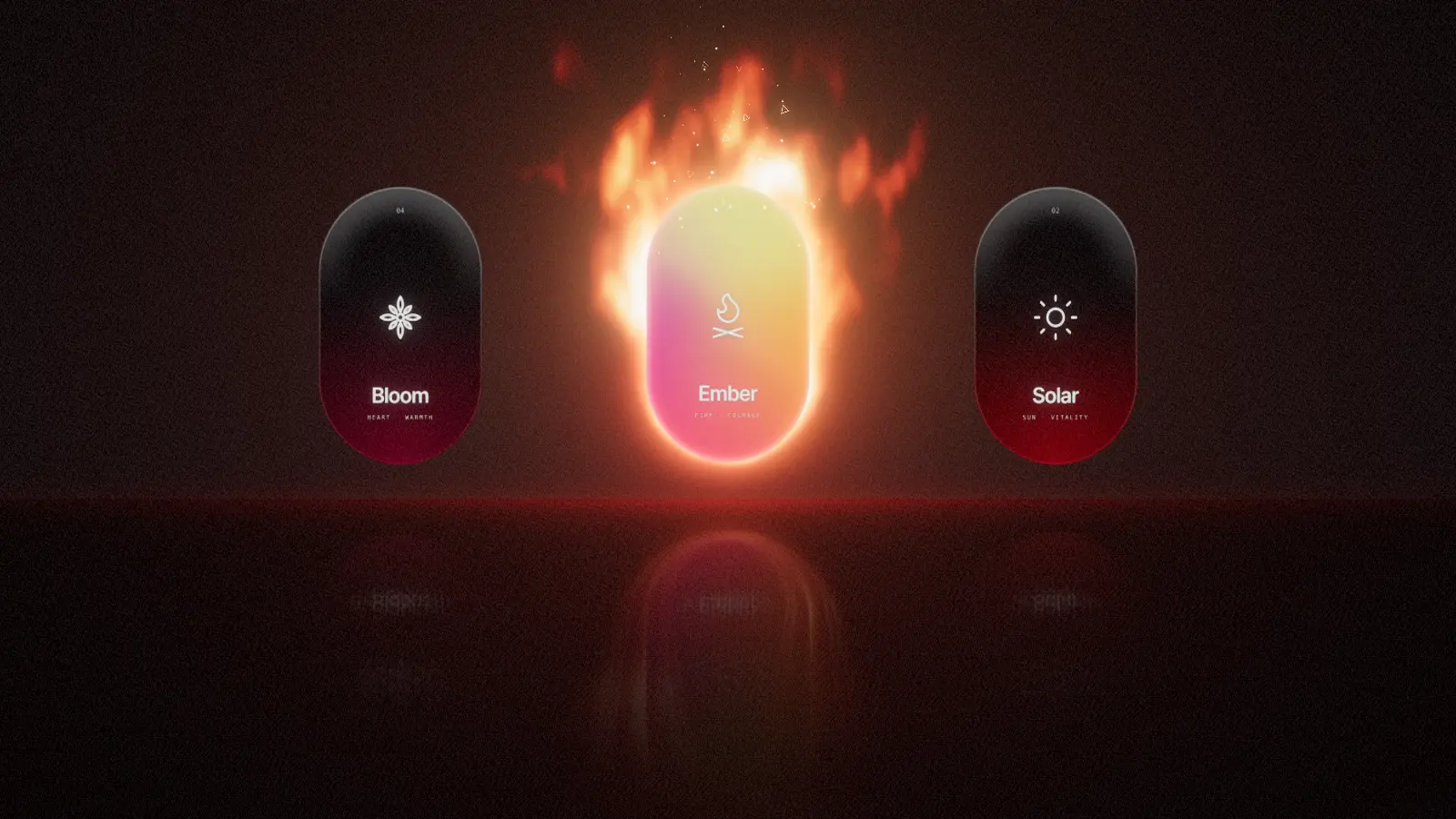
Flames climb over the top of the card and lick down its sides while embers and tiny hollow triangles drift upward. Move the cursor and the fire leans with it.
Showcase · Three.js · WebGPU · TSL
Elemental Cards is an interactive 3D card carousel. Each card is a pill of smoked glass with a printed icon, name and two keywords. When a card reaches the centre, its face turns into a drifting iridescent gradient and its element comes alive around it: fire, sunlight, wind or a blooming lotus.
The scene is not a video. It is drawn 60 to 120 times per second by your graphics card with Three.js and the new WebGPU renderer, and it reacts to scrolling, the cursor and clicks. On browsers without WebGPU it switches to WebGL 2 automatically.
The four cards
Every effect is drawn around the card in card space, so it tilts with the card and follows it through the carousel. Here is what each one does and the technique behind it.
Flames rise highest above the card and stay low along its sides. Embers drift up and fade, and a handful of hollow triangles float through the fire. Moving the cursor quickly sideways makes the flames lean against the motion.
Technique: The flame starts from the distance to the card outline. Three noise layers scroll upwards at different speeds and break the smooth gradient into tongues. A colour ramp maps the heat from deep red through orange to a pale core.
The rim ignites before the face fills with colour, then rays fan out and sparks and little rings drift away from the edge. Rays and glow gather on the side nearest to your cursor.
Technique: Two exponential falloffs from the distance field give the hot rim and the wide glow. The rays are two noise bands read around the card by angle; because the noise texture tiles, the circle closes without a seam.
Thin streamlines hug the card, brighter ones mixed with soft teal ones, with dashes travelling from left to right. The cursor pushes the air aside, and the wind speeds up near it and after a click.
Technique: The lines are contours of a sideways-stretched distance field, warped by slow noise. Each contour gets its own random speed and dash length. A separate clock drives the dashes so they can accelerate without jumping.
Thirteen petals in four layers unfold behind the card, the inner ones first. They glow at the edges, breathe slowly and lean away from the cursor, while pink motes rise around the flower.
Technique: Each petal is a curved mesh shaped on the CPU once. Activation drives a staggered ease per layer. The petal material fades its outermost edge, which anti-aliases the outline without multisampling.
How it's built
The cards use the Three.js WebGPURenderer and TSL, the Three.js Shading Language. TSL lets you write shaders as TypeScript functions that compile to WGSL for WebGPU and to GLSL for WebGL 2.
One small function knows how far any point is from the pill outline. The card edge, its anti-aliasing, the glass rim and every glow around it are derived from that single number.
// Signed distance to the pill-shaped card, in card space.
// Negative inside, zero on the outline, positive outside.
function sdPill(p: Node<"vec2">) {
  const h = HH - HW
  return length(vec2(p.x, p.y.sub(clamp(p.y, -h, h)))).sub(HW)
}A resting card is smoked glass: black at the top, the element's tint pooling at the bottom, a hairline rim. When lit, four soft colour blobs drift over the face, gently warped by noise. The printed face is a canvas texture drawn once at start-up.
Each element adds a plane behind its card. The shader computes light only, and the planes are blended additively without touching the alpha channel, so the dark room shows through and the card stays on top.
// Flames: a gradient from the card outline outwards,
// broken into tongues by three layers of rising noise.
const reach = mix(0.05, 0.62, up.pow(1.25)).add(above.mul(0.95))
const heat = clamp(
  float(1).sub(d.div(reach)).add(noise.mul(mix(0.35, 1.05, up))).sub(0.18),
  0.0, 1.0,
)Embers, sparks, rings and motes are instanced sprites. Each instance derives its position, size and fade from its index and the time inside the shader, so the CPU never updates a particle.
// Embers live entirely on the GPU: no per-frame JavaScript.
const life = fract(time.mul(rnd(1).mul(0.35).add(0.28)).add(rnd(2)))
material.positionNode = vec3(x0, float(HH - 0.25).add(life.mul(1.1)), 0.02)
const embers = new THREE.Sprite(material)
embers.count = 70 // one draw call, 70 instancesA single post-processing pass paints the room behind the cards in the lit element's colour, mirrors the cards in the floor with a blur that grows with distance, adds bloom and a touch of film grain. Bloom is held back over the cards so their faces stay readable.
// WebGPU where available, WebGL 2 everywhere else.
const renderer = new THREE.WebGPURenderer({ canvas, antialias: false })
await renderer.init()
renderer.backend.isWebGPUBackend // true on WebGPU
Interaction
Static cards are a picture. These respond to what you do, which is what keeps visitors on a landing page.
The card under your cursor leans toward it in 3D. A soft glare slides over the glass and light catches the rim nearest to the pointer.
Flames lean, sun rays gather, wind bends around the pointer and the lotus sways. A faint light in the element's colour follows the cursor through the room.
Clicking the lit card sends out a ring in its colour, a burst of sparks and a short flare of its effect. Clicking a side card scrolls to its chapter.
The section is pinned while you scroll. Scroll position moves the carousel continuously, so effects fade out as a card leaves the centre and build up as the next one arrives.
Performance
A beautiful effect that stutters looks broken. These are the decisions that keep the scene smooth on a laptop and usable on a phone.
Shapes, effects, particles, reflection and bloom are all shaders. Per frame, JavaScript only updates a handful of numbers: carousel position, cursor and the lotus petal angles.
Procedural 3D noise per pixel is expensive on large glow planes. One tiling 256 × 256 noise texture, generated once at start-up, replaces it with cheap texture reads.
Every edge is anti-aliased inside its shader, so the half-float post-processing target does not need costly MSAA.
The engine measures frame times against the display's refresh rate. If frames keep arriving late, it lowers the pixel ratio step by step and raises it again when there is headroom.
The engine loads when the section comes near, renders only while it is on screen and stops when the tab is hidden. The page text is server-rendered HTML and never waits for WebGL.
The WebGPURenderer uses WebGPU where the browser supports it and falls back to WebGL 2 automatically. The same TSL code runs on both.
For your website
The same building blocks work far beyond elements and lotus flowers. A few ideas where an interactive 3D card section pays off:
Make the recommended plan glow, react to the cursor and ignite on selection.
Give every feature its own visual effect that explains it at a glance.
Reveal a personality type, a recommendation or a reward with a moment people remember.
Rarity glows, foil effects and unlock animations for game UIs and fan communities.
A hero section visitors want to play with, without hurting load time or SEO.
A scroll-driven story for a launch, a product drop or a conference.
I build it to your brief: your colours, your content, the number of cards and the effects you want, in plain Three.js or inside React and Next.js. You get clean, documented code and a section that works on phones too.
TypeScript, React & Next.js developmentIt uses WebGPU in browsers that support it, such as current Chrome and Edge and recent Safari and Firefox versions on supported systems. Everywhere else the same code runs on WebGL 2. If neither is available, the section shows a still image and all text stays readable.
Not when it is built this way. All text is server-rendered HTML that search engines read directly. The 3D engine loads only when the section comes near, pauses when it is off screen, and a lightweight poster image shows until the first frame is ready.
Yes. The engine is a framework-independent TypeScript class that a small client component mounts and disposes. This page itself is a Next.js page.
Yes. Colours, number of cards, texts, icons, effects and the scroll story are all adjustable. I build exactly what your brief describes and agree any open design questions with you first.
I work at 75 USD per hour. The total depends on the number of cards and effects, the interactions and the integration into your site. We agree on scope and an estimate before I start.
TSL, the Three.js Shading Language, lets you write shaders as JavaScript or TypeScript functions. Three.js compiles them to WGSL for WebGPU or to GLSL for WebGL 2, so one shader runs on both.
Tell me what the section should do, where it will live and your timeline. I reply with questions or a first estimate. Writing in German is fine too.
Design inspiration: the elemental cards concept by Zsolt Kacso. This version was rebuilt from scratch with Three.js, WebGPU and TSL. Original post on X