
A Laravel agentic AI chatbot is easy to demo and hard to operate.
The demo version is usually simple: add a chat box, send a message to an AI provider, stream the answer back to the user, and call it done. The production version is different. Real support bots need trusted knowledge, source updates, conversation history, widget security, API calls, escalation paths, and a way to debug what happened when the answer was wrong.
That is where Laravel and Filament become a strong combination. Laravel gives you the application layer. Filament gives you the control panel. A support bot managed from Filament can become more than a chat bubble: it can be a traceable AI workflow surface for your product, support team, and customers.
This guide explains what a production-ready Laravel AI support bot needs, when RAG is enough, when agentic workflows become useful, and how a Filament-native plugin can reduce the amount of infrastructure you have to build yourself. If you want the concept-level background first, start with what an agentic chatbot is.
Want the finished Filament-native version? Try the Filament Agentic Chatbot live product page or buy Agentic Chatbot directly if you already know you need RAG, workflows, API connectors, and an embeddable widget.
Quick Answer
A Laravel AI support bot should not only answer questions. For real SaaS and customer support use cases, it should retrieve answers from your own documentation, ask follow-up questions, route requests, call approved APIs, collect structured details, and store a trace of the conversation.
Use a RAG chatbot when users mainly ask documentation or product questions. Use an agentic chatbot when the support journey has steps: classification, intake, branching, API calls, ticket creation, escalation, or workflow review.
Why a Normal AI Chatbot Is Not Enough
A basic chatbot answers one message at a time. That can be useful for FAQs, simple explanations, and early prototypes. But customer support is rarely just one message.
A user might ask:
“Why is my integration not working?”
A generic chatbot can respond with troubleshooting tips. A production support bot should do more:
- Ask which integration the user is using.
- Retrieve the relevant setup documentation.
- Check whether the account has the feature enabled.
- Ask for missing details if the problem is unclear.
- Route the issue as billing, setup, bug, or feature request.
- Create a support record if self-service fails.
- Leave a trace so the team can review the path later.
That is not a single prompt. It is a workflow.
This is the main difference between a simple Laravel AI chatbot and a support bot that can actually reduce work for a team. The value is not only the model response. The value is the controlled process around the response.
Start with RAG: Your Bot Needs Trusted Knowledge
Most support bots should start with RAG. For the storage and retrieval layer, the companion guide on a Laravel RAG chatbot with pgvector goes deeper into the implementation path.
RAG means retrieval-augmented generation. Instead of asking the model to answer from general training data, your Laravel app retrieves relevant chunks from trusted sources before generating the response.
For a Laravel product, those sources might include:
- product documentation
- installation guides
- pricing rules
- support policies
- onboarding notes
- internal runbooks
- PDFs
- Markdown files
- help center URLs
- API-fed JSON records
This matters because customers do not need a generic AI answer about your product. They need the answer that matches your actual product, your current docs, and your support rules.
A good Laravel RAG chatbot should let your team manage sources, re-ingest content, inspect failures, tune retrieval, review conversations, and show citations. Without that operational layer, you can easily end up with a chatbot that answers from stale or incomplete information.
When RAG Is Enough
RAG is enough when the user mostly asks questions and the answer already exists in your knowledge base.
Good RAG-only use cases include:
- documentation chatbot for a Laravel package
- product FAQ widget
- help center assistant
- onboarding Q&A bot
- internal knowledge base assistant
- installation support bot
- pricing and plan explanation bot
In these cases, the chatbot’s job is to find the right context and answer clearly. You do not need complex branching yet. You need source ingestion, retrieval quality, citations, and a clean widget.
For many teams, this is the best first step. Launch a knowledge-grounded chatbot, monitor what users ask, improve missing documentation, and only add workflows when the support journey demands it.
When You Need Agentic Workflows
You need agentic workflows when the chatbot must guide the user through a process.
That usually happens when support requires more than knowledge retrieval:
- the bot must collect structured information
- the answer depends on account-specific data
- the user needs to be routed into different paths
- an external API should be called
- a database record should be created or updated
- a ticket should be prepared for a human
- the team needs step-level run tracing
This is where an agentic chatbot becomes useful.
An agentic support bot can still use RAG, but RAG becomes one part of a larger workflow. The bot can retrieve knowledge, ask for missing details, classify intent, branch into a support path, call a connector, and return a final response.
The important part is control. A production agentic chatbot should not let a language model randomly decide what to do. It should use explicit workflow nodes, permissions, connector profiles, and execution traces.
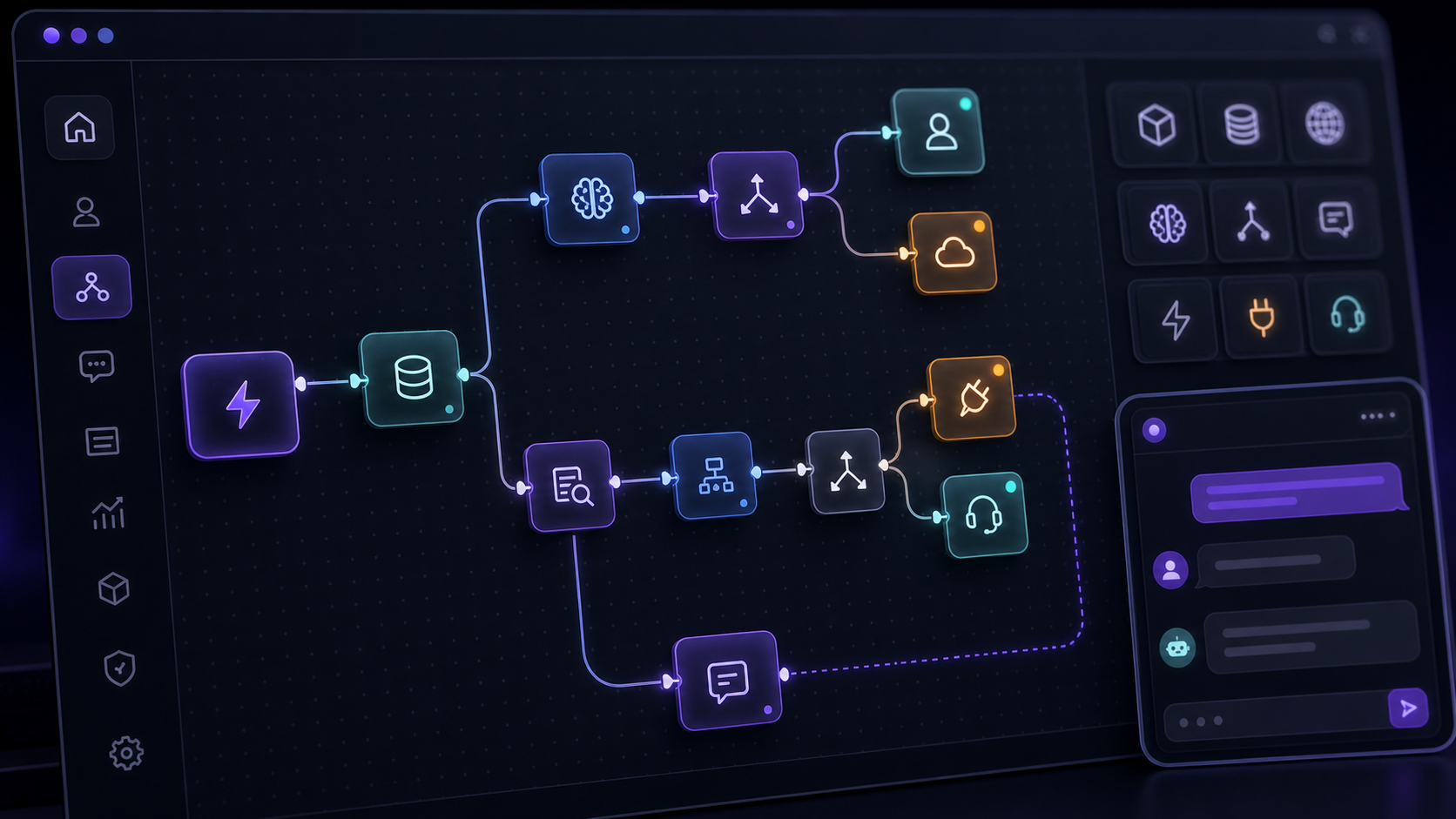
Example: Support Routing for a Laravel SaaS
Imagine a Laravel SaaS product with three common support categories:
- billing questions
- setup questions
- technical issues
A basic chatbot might treat all of them the same. An agentic workflow can separate them.
The flow could look like this:
- The user asks a support question.
- The bot classifies the intent as billing, setup, or technical.
- The workflow retrieves relevant documentation.
- If the question is billing-related, the bot asks for plan or invoice context.
- If it is setup-related, the bot asks which integration or environment is involved.
- If it is technical, the bot asks for error messages and version details.
- The workflow calls an approved internal endpoint if live account data is needed.
- The bot returns a grounded answer or prepares an escalation summary.
- The support team can inspect the workflow run later.
That is the difference between “AI answered a message” and “AI helped complete a support process.”
Why Filament Is a Good Control Plane
Filament is already where many Laravel teams manage operational data: users, resources, settings, dashboards, records, and admin workflows.
That makes it a natural place to manage an AI support bot.
A Filament-native chatbot setup can expose the parts that non-developers need without giving them unsafe access to infrastructure:
- bot names and prompts
- model and provider settings
- knowledge sources
- source ingestion status
- widget branding
- allowed domains
- quick prompts
- conversation history
- workflow versions
- API connector profiles
- run traces
- analytics and health checks
Developers still control the code, queues, deployment, provider keys, permissions, and custom integrations. Product and support teams get an admin surface where they can operate the bot without editing code.
That boundary is important. AI features fail when every small content update requires a developer. They also fail when business users can change everything without guardrails. A Filament-managed support bot gives both sides a cleaner operating model.
What a Production-Ready Laravel AI Support Bot Needs
Before you ship a support bot to real users, check the boring parts. They are usually what decide whether the project survives production. Use this alongside the Filament AI chatbot plugin checklist when you compare packages.
A production-ready setup should include:
- source ingestion for URLs, files, text, and structured records
- vector storage through pgvector, Chroma, or another backend your team can operate
- queue-based ingestion and embedding jobs
- retry handling for failed ingestion
- bot-specific retrieval settings
- citations or source references
- conversation history
- widget configuration for an embeddable Laravel AI chatbot widget
- domain restrictions for public embeds
- signed tokens for access-controlled widgets
- rate limits for anonymous users
- provider key validation
- workflow run history
- step-level traces for agentic flows
- privacy and retention behavior
- a way to test before deployment
This is why many Laravel chatbot projects grow beyond the initial estimate. The LLM call is only one small piece. The control plane, ingestion system, widget runtime, and operational tooling are the real work.
Build vs Buy: When a Plugin Makes Sense
Building from scratch makes sense when the chatbot is narrow, temporary, or deeply custom. If you are still comparing the options, read the full Laravel AI chatbot build vs buy decision.
Build it yourself if:
- you only need an internal prototype
- one developer will manage everything
- the bot uses one fixed source
- no public widget is needed
- no support team needs to manage sources
- conversation review can wait
- the chatbot is core IP for your product
A plugin makes more sense when the chatbot needs to become part of a real product or client delivery.
Buy or use a plugin if:
- you need to launch quickly
- the bot should be managed from Filament
- support users need to update knowledge sources
- you need an embeddable widget
- you need multiple bots
- you need RAG and citations
- you need workflow automation
- you need API connectors
- you need run tracing
- you need a demoable product surface
For agencies and SaaS teams, the opportunity cost is often the deciding factor. Every hour spent rebuilding bot CRUD, source ingestion, widget settings, and conversation review is an hour not spent on the customer-specific workflow that actually matters.
Where Agentic Chatbot Fits
If your Laravel team only needs grounded Q&A, a focused RAG chatbot can be enough.
If your support bot also needs branching, API calls, data collection, workflow releases, and execution traces, you need a broader agentic surface. The detailed comparison in Agentic Chatbot vs RAG Chatbot explains where that line usually sits.
That is the use case for Filament Agentic Chatbot. It is built for Laravel and Filament teams that want a support bot with RAG, visual workflows, API connectors, an embeddable widget, and operational tooling inside the Filament panel.
The idea is simple: start with grounded answers, then add agentic behavior only where it solves a real support problem.
Practical Use Cases
AI Support Bot for Laravel SaaS
Answer product questions from docs, classify issues, collect account details, and prepare escalations with context.
Onboarding Assistant
Guide new users through setup, ask follow-up questions, recommend the next step, and retrieve the right documentation at the right moment.
Lead Qualification Chatbot
Ask structured questions, classify the lead, route enterprise prospects differently, and send the result to a CRM or internal system.
Order or Account Status Assistant
Call an approved API, explain the current status, and escalate edge cases when the answer cannot be resolved automatically.
Internal Helpdesk Assistant
Search internal runbooks, explain processes, and trigger approved workflows for operations or support teams.
A Simple Decision Framework
Choose a RAG chatbot when the main problem is knowledge.
The user asks a question. The bot retrieves relevant content. The bot answers with context and citations.
Choose an agentic chatbot when the main problem is process.
The user needs help completing a task. The bot asks questions, chooses paths, retrieves knowledge, calls tools, and leaves a trace.
For a Laravel product, the most practical path is often:
- Start with RAG for documentation and support Q&A.
- Review real conversations.
- Identify repeated workflows.
- Turn those workflows into explicit agentic flows.
- Add API connectors only where live data or actions create real value.
Do not add agentic complexity just because it sounds advanced. Add it when it removes friction from a real support path.
Recommended Starting Point
If you are evaluating this for a Laravel or Filament product, start with a staging pilot.
Pick one support workflow. Add your documentation sources. Configure one bot. Embed the widget on a test page. Watch what users ask. Then decide whether the next improvement is better knowledge, better retrieval, or a real workflow.
If you already know you need RAG plus workflows, API calls, widget delivery, and run tracing, review the Agentic AI Chatbot Builder on Filament or go directly to checkout.
A chatbot that only talks can be useful. A chatbot that understands your docs, follows your process, calls approved tools, and leaves a trace can become a real support automation layer for your Laravel app. Start with the live product page, review the Filament plugin page, or buy Agentic Chatbot directly.
FAQ
What is a Laravel AI support bot?
A Laravel AI support bot is a chatbot or assistant built into a Laravel application that helps users answer product, setup, billing, or technical questions. In production, it usually needs RAG, conversation history, widget security, and a way for teams to manage sources and settings.
What is the difference between RAG and agentic workflows?
RAG helps the bot answer with trusted knowledge. Agentic workflows help the bot move through a process. A support bot can use both: RAG for grounded answers and workflows for routing, intake, API calls, and escalation.
Is Filament a good place to manage an AI chatbot?
Yes, especially when your team already uses Filament as the admin panel. Filament can provide the operational surface for bots, sources, widget settings, conversations, workflow runs, and connector profiles.
When should I use an agentic chatbot instead of a normal chatbot?
Use an agentic chatbot when the user journey has steps. Examples include support routing, onboarding, lead qualification, order status checks, API calls, database actions, and human handoff.
Can a Laravel AI support bot call external APIs?
Yes, but it should do so through controlled connector profiles or explicit workflow nodes. Do not let a prompt call arbitrary tools without permissions, validation, and logging.